

If you’re reading this, chances are you’ve felt that familiar, dull ache radiating from your wrist after a long day at the desk. Maybe it’s a sharp twinge when you grip your mouse, or a constant numbness that makes you shake your hand out to “wake it up.” You aren’t alone. Thousands of Ohioans—from Cleveland healthcare workers to Columbus remote employees—struggle with repetitive strain injuries caused by standard peripherals. The good news? You don’t have to live with the pain. Switching to a specialized device is the single most effective step you can take, but with dozens of shapes, sizes, and features on the market, choosing the right one can feel overwhelming. That’s why we’ve built this definitive guide to help you navigate the process and find lasting relief.
In this comprehensive guide, we will break down exactly what causes your discomfort, how to identify the right shape for your grip, and which features actually matter for recovery. We’ll also touch on local buying strategies and physical therapy adjuncts to ensure you get the most out of your investment.
What Causes Wrist Pain When Using a Standard Mouse?
Wrist pain from computer use is primarily caused by sustained awkward posture and pressure on the median nerve. When you use a flat, traditional mouse, your forearm bones (radius and ulna) twist, forcing the wrist into pronation. This unnatural rotation compresses the carpal tunnel and strains the tendons, leading to inflammation, tingling, and pain.
The Biomechanics of Pronation and Extension
Think about a standard mouse. To click, you have to lay your hand flat, parallel to the desk. This forces your radius bone to cross over your ulna. Over time, this “screwing” motion creates friction in the wrist joint. Ergonomic mice are designed to position your hand in a handshake position, which keeps the bones parallel and removes the strain.
Why Ohioans Are Especially Prone to This Issue
Ohio ranks high for sedentary desk jobs in sectors like finance (Cincinnati) and technology (Columbus). Furthermore, cold winter months often lead to decreased blood flow and stiffer joints, meaning the pain can feel exacerbated from November through March. If you are already managing arthritis or tendonitis, the cold climate combined with a bad mouse grip can be a recipe for chronic pain.
Identifying the Difference Between Muscle Fatigue and Nerve Pain
Understanding what hurts is crucial. If the top of your forearm feels sore, that is muscle fatigue from continuous lifting. If you feel a sharp, electric shock or numbness in your thumb, index, and middle fingers, that is median nerve compression (carpal tunnel). Ergonomic mice help with both, but nerve pain usually requires a more vertical angle (closer to 60-70 degrees) for immediate relief.
What Are the Different Types of Ergonomic Mice Available?
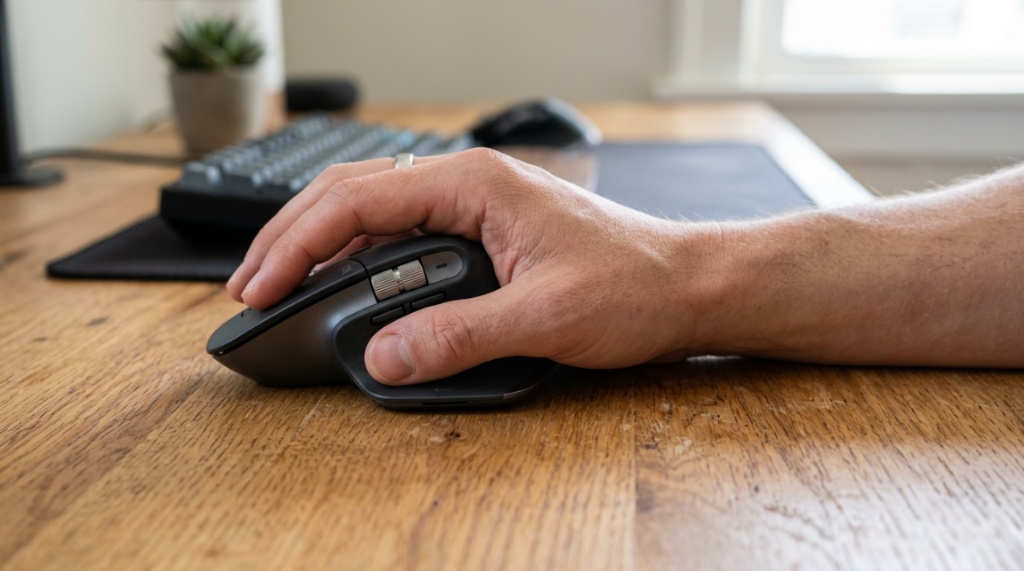
There are three primary categories of ergonomic mice: vertical mice, trackball mice, and adjustable angled mice. Each offers a unique benefit depending on whether your pain stems from the wrist joint, the thumb, or the entire arm. Understanding these distinctions is the first step in narrowing down your selection.
Vertical Mice: The Handshake Grip
These are the most popular choice for carpal tunnel sufferers. They rotate your hand to a 57-70 degree angle. This stops the bone crossing entirely. Models like the Anker Vertical or Logitech MX Vertical allow your hand to rest naturally, reducing muscle activation in the extensor carpi ulnaris. They are excellent for all-day productivity but do require a slight adaptation period (usually 2-3 days).
Trackball Mice: Zero Movement for the Arm
If your pain is in the forearm or elbow as well as the wrist, a trackball mouse is a game-changer. You keep your hand completely stationary and only move your thumb or index finger to roll a ball. The Logitech MX Ergo is a classic. This eliminates the need to grip the mouse to move it, significantly reducing tension in the shoulder and neck—a common secondary pain point for Ohio workers.
Just as you would configure your hardware and optimize your gaming laptop for VR for peak performance, setting up your workspace with the right ergonomic peripherals ensures comfort during long hours of computer use.
Adjustable and Thumb-Support Options
Some mice, like the J-Tech Digital or Contour Unimouse, allow you to adjust the angle of the “tent” and rotate the thumb rest. This is ideal if you have suffered a previous fracture or have arthritis deformities that make a fixed angle uncomfortable. They are more expensive, but they offer the highest level of customization for unique hand shapes.
How to Determine the Right Size and Grip Style for You
To choose the right mouse, you must first measure your hand length and identify your grip style. A mouse that is too small will cramp your hand; one that is too large will strain your reach. The goal is a relaxed claw grip where your fingers naturally drape over the buttons without stretching.
Measuring Your Hand for the Perfect Fit
Measure from the tip of your middle finger to the base of your palm (where the wrist begins). If the measurement is less than 17 cm, you have a small hand and need a compact mouse. If it is between 17-19 cm, you have a medium hand. Anything over 19 cm requires a large chassis. Check the manufacturer’s specs for “hand size compatibility” before buying—most reputable brands list this clearly.
Understanding Grip: Palm, Claw, and Fingertip
- Palm Grip: Your entire hand rests on the mouse. You need a wide, tall body with a deep thumb rest.
- Claw Grip: Your palm hovers and only the fingers arch down. You need a shorter mouse with a high arch in the middle.
- Fingertip Grip: Only your fingertips touch the mouse. You need a ultralight, low-profile vertical mouse to avoid straining the tips.
Why Shape Matters More Than Brand
A premium laser sensor won’t fix your wrist if the shape is wrong. Hold a physical demo unit if possible. Many Ohio electronics retailers (like Micro Center in Mayfield Heights or Parkville) have display models. If you are shopping online, order from a retailer with a lenient return policy. You must “test drive” the mouse for a week to see if the pressure point on your palm matches your anatomy.
Which Features Should You Prioritize for Chronic Pain?
When your pain is severe, you shouldn’t compromise on critical features. Beyond the shape, you need to look at button actuation force, scroll wheel resistance, and connectivity latency. These factors dictate how much effort each click requires, directly impacting tendon strain.
Lightweight vs. Heavyweight: The Weight Debate
For ergonomic purposes, lighter is usually better. A heavier mouse requires more effort to initiate movement, engaging the shoulder muscles. However, some people with tremors prefer a heavier base for stability. Ideally, look for a mouse between 90 grams and 120 grams. If the mouse is wireless, check the weight with the battery included—some designs become dangerously heavy once the AA battery is inserted.
Switches, Buttons, and Sensory Motor Feedback
Look for “low-force switches.” Standard mice require 70-80 grams of force to register a click. Over 10,000 clicks a day, that adds up. Gaming-grade ergonomic mice often use switches that require only 50-60 grams. Furthermore, if you use CAD software or Excel, ensure the scroll wheel has a “free-spin” mode to reduce finger flicking fatigue.
Connectivity: Wired or Wireless?
Wireless mice introduce latency, which might cause you to grip the mouse tighter to compensate for slower cursor movement. For precision work, a wired mouse (or a wireless mouse with a 2.4GHz dongle rather than Bluetooth) provides a 1000Hz polling rate. This ensures instant response, allowing you to maintain a relaxed grip knowing the cursor will land exactly where you want it.
Are There Specific Ergonomic Mouse Settings You Should Enable?
Yes, adjusting your operating system settings is just as critical as the hardware. You can significantly reduce physical movement by fine-tuning pointer speed and enabling precision enhancement. This allows you to move the pointer across the entire screen with a minimal flick of the wrist.
Adjusting DPI and Pointer Speed
Increase your pointer speed in the OS settings (or use the DPI switch on the mouse) to a level where you can cross the screen with a one-inch movement. This keeps your wrist in a neutral, central position rather than extending to the edges. A higher DPI (1600-2400) is recommended for 1440p or 4K monitors. This is a non-negotiable step for reducing travel distance.
Ergonomic Software: Rebinding and Macros
Use the manufacturer’s software (like Logitech Options or Razer Synapse) to disable any buttons that you don’t use. This prevents accidental clicks that cause jarring finger movements. If you frequently perform “double-click” actions, bind that to a dedicated side button. This transforms a repetitive, high-tension motion into a simple, low-effort press.
Keyboard Shortcuts to Reduce Mouse Dependence
You can use keyboard shortcuts to reduce your mouse usage without sacrificing efficiency. For example, in Windows, use Alt + Tab to switch windows instead of clicking the taskbar, and Ctrl + L to select the address bar in your browser. In Excel, use Enter to move down and Shift + Enter to move up, saving your wrist hundreds of micro-adjustments daily, especially if you work in data-heavy industries common in Ohio.
How Long Does It Take to Adjust to a New Ergonomic Mouse?
The average adaptation period is between 3 to 7 days. During this time, your wrist pain may actually increase slightly as new muscles are engaged. However, by the end of the second week, you should notice a significant reduction in deep aching and tingling, provided you also adjust your posture and setup.
What to Expect in the First 48 Hours
Expect clumsiness. Your fine motor skills will be challenged because you are using different muscle pathways. You might find yourself accidentally clicking the right-button instead of the left. Do not give up. For the first two days, use the ergonomic mouse for only 50% of your work, switching back to your old mouse for precision tasks like photo editing. This gradual transition prevents acute muscle soreness in your deltoid.
Red Flags: When to Stop and Try Something Else
If, after one week, you feel a burning sensation in the back of your hand or sharp pain in the thumb joint, the mouse is likely the wrong size or angle for your anatomy. A 40-degree vertical angle is rarely enough for advanced carpal tunnel—you may need a 60-degree option or a trackball. If you have a current diagnosis of De Quervain’s tenosynovitis (thumb side pain), a thumb-operated trackball is usually a poor choice. Look for a finger-operated trackball instead.
Combining Hardware with Physical Therapy
While the mouse is a solution, it is not a cure-all. Complement your new purchase with regular wrist extensor stretches (hold your arm out, palm down, and gently pull the fingers down). Ohio has excellent occupational health networks; consider one or two sessions with an occupational therapist to ensure your workstation overall is aligned. They can assess your chair height and keyboard tilt to ensure the mouse is not compensating for other postural issues. For a comprehensive review of top-rated and cost-effective models available locally, check out this resource for the ergonomic mouse for wrist pain Ohio residents trust to ensure you skip the guesswork and buy a proven winner.
Is an Expensive Mouse Always Better for Wrist Pain?
No. Price does not correlate linearly with pain relief. A $100 mouse may have advanced sensors and Bluetooth multi-device pairing, but if the angle of the “tent” is too aggressive, it won’t help you. Conversely, a $30 Anker vertical mouse often provides immediate relief because it hits the key 57-degree angle. The biggest price drivers are battery life, build materials, and software features, not orthopedic effectiveness.
The “Gaming” Crossover: Why They Work
Many ergonomic features were popularized by the gaming industry. High-grade gaming mice are often ambidextrous and offer adjustable weights. While they aren’t marketed as “medical devices,” a lightweight gaming mouse (like a Glorious Model D or Razer Viper) often works well for wrist pain because they encourage a relaxed fingertip grip, reducing the overall strain on the carpal tunnel. However, they lack the vertical rotation, so they are best for mild discomfort rather than severe conditions.
Warranty and Return Policies Matter
Do not buy a ergonomic mouse from an online marketplace that has a restocking fee. Because this is a medical purchase for your livelihood, you must ensure the retailer offers at least a 30-day return window. Companies like Amazon and direct manufacturers (Logitech, Evoluent) typically offer “satisfaction guarantees” which at least allow you to swap for a different angle without penalty.
When Should You See a Doctor for Your Wrist Pain?
You should see a doctor immediately if you experience numbness that wakes you up at night, weakness in your grip (dropping objects), or pain that radiates up past your elbow into your shoulder. These are signs of moderate to severe nerve compression. While an ergonomic mouse can help prevent further damage, it cannot reverse severe scarring of the tendons or nerve damage that may require surgical intervention.
Self-Assessment: The Phalen’s Test
Press the backs of your hands together with fingers pointing downwards, holding the position for 60 seconds. If this reproduces your tingling or numbness, you very likely have carpal tunnel syndrome and should consult a healthcare provider. This test is a strong indicator that you need a more vertical (60-degree+) mouse setup immediately.
How Your Mouse Fits into a Recovery Plan
Doctors generally recommend a three-pronged approach: splinting (especially at night), anti-inflammatory medication, and ergonomic modification. When combined with your new mouse purchase, these steps can often avoid surgery. Be honest with your doctor about your daily mouse usage time. If you use a mouse for 8+ hours a day, you are in the “high-risk” category and should strictly adhere to the ergonomic suggestions they provide.
Frequently Asked Questions
Can a vertical mouse cure carpal tunnel syndrome?
No, an ergonomic mouse cannot cure advanced carpal tunnel syndrome, but it can significantly reduce the pressure on the median nerve. This allows the inflammation to subside, often relieving symptoms completely for mild to moderate cases and preventing the progression of the condition. For severe cases, use the mouse as a preventative measure post-treatment.
Is a trackball mouse better than a vertical mouse for arthritis?
For osteoarthritis, a trackball is often better because it limits joint movement entirely. There is almost no mechanical stress on the wrist joint. However, for rheumatoid arthritis, the fine motor control required to manipulate the ball with the thumb can be painful, making a vertical mouse a better choice.
Do ergonomic mice work with Mac computers?
Yes, most major ergonomic mice (Logitech, Evoluent, Anker) are fully compatible with macOS. However, you may need to install additional drivers to unlock the custom button mapping and scrolling speeds. Basic features like pointing and clicking will work natively with Bluetooth or the USB dongle.
How often should I replace my ergonomic mouse?
You should replace it every 2 to 3 years, or when you notice the switches becoming spongy and requiring more force to click. Also, check the rubberized coating on the thumb rest. When it starts to degrade and become sticky or slippery, it’s time for a replacement, as this can alter your grip and cause you to squeeze the mouse harder.
What is the ideal sitting posture to go along with an ergonomic mouse?
Your elbow should be bent at a 90-degree angle, with your forearm parallel to the floor and supported by the armrest. The mouse should sit at the same level as your keyboard spacebar. Most importantly, ensure your chair is high enough so your shoulders are relaxed, not shrugged up toward your ears, creating a neutral spine.
Conclusion
Choosing the right ergonomic mouse is not about buying the most expensive gadget; it’s about understanding your body’s specific mechanics and matching them to the appropriate technology. Whether you opt for a high-tilt vertical mouse, a zero-movement trackball, or an adjustable apparatus, the goal is the same: to restore your hand to a neutral, handshake position and eliminate the strain that causes your pain. Start by measuring your hand, assessing your grip, and prioritizing features that reduce click force and travel distance.
Don’t let wrist pain rob you of your productivity or your enjoyment of life outside work. Ohio’s harsh winters and demanding professional landscape require you to be at your best. Take the time to research trusted models, consult the resources available, and invest in your health. Your wrists are the bridge between you and your digital world—treat them with the care they deserve. Make the switch today, and give your hands the relief they’ve been begging for. Your future, pain-free self will thank you.


